Your Cooler's Thermostat Is Lying to You (a Little)
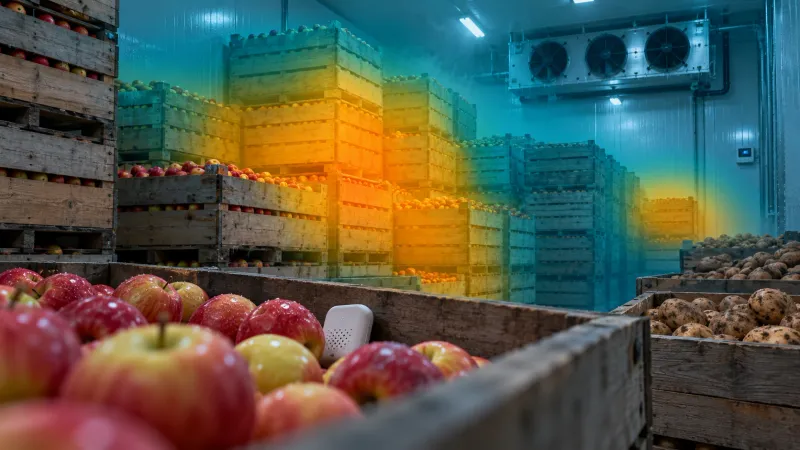
Your cooler's display says 2°C. The thermostat is not wrong, exactly. It is reporting the temperature of the air at the one spot where its sensor sits, and that air probably is 2°C. What it cannot tell you is what is happening in the bin in the middle of the stack, in the back corner where the fan never quite reaches, or in the load of produce that came in from the field this afternoon and is still giving off heat.
In an empty room, that gap does not matter much. In a loaded room during harvest, it is the difference between a reading that looks fine and product that is not.
This article walks through where hot spots form in a loaded cooler, why room-level readings miss them, and how a few sensors placed in the bins close the gap. It pairs with our guide to setting temperature alert thresholds for cold rooms, because once you have readings from inside the stack, those readings need thresholds of their own.
Note: This article is operational guidance for cold storage operators, not legal or food safety advice. Storage temperatures and monitoring obligations vary by commodity, licence type, and activity. Consult the CFIA or a qualified food safety professional for requirements specific to your operation.
What the wall sensor is actually measuring
Most cooler controllers read air temperature, usually at or near the evaporator's return air, or from a sensor mounted on a wall at a convenient height. That placement makes sense for controlling the refrigeration system. The controller needs to know the temperature of the air it is cooling so it can decide when to run the compressor.
But controlling the equipment and knowing the condition of your product are two different jobs. The controller's sensor answers one question: is the air coming back to the coil at setpoint? It does not answer the question you actually care about: is everything in this room at setpoint?
Two things make those answers diverge.
Air changes temperature quickly. Product does not. A room full of bins has an enormous amount of thermal mass compared with the air around it. Air can drop to setpoint within an hour of the door closing. A bin of potatoes, apples, or squash takes far longer, and the product in the centre of the bin takes longer still, because it is insulated by the product around it.
Air takes the easy path. Cold air leaves the evaporator and follows the route of least resistance back to the return. Wherever the stack blocks that route, air slows down or stops, and the product in that pocket cools slowly or not at all.
So the thermostat is satisfied, the compressor cycles off, and the display reads 2°C, while parts of the room are still several degrees warmer than that and holding there.
Where hot spots form in a loaded cooler
Every room is different, but the same handful of locations show up again and again.
The middle of the stack. Bins and pallets packed tightly together form a block. The outside faces get cold air; the core gets very little. The bin in the centre of a stack is often the last thing in the room to reach setpoint, and the first to drift if airflow is interrupted.
Corners and dead zones. Back corners, the far end of the room from the evaporator, and gaps behind stacks pushed up against a wall tend to see poor circulation. If a stack is tight to the wall, the air that should travel down that wall has nowhere to go.
Blocked airflow paths. A new load set down in front of the evaporator, or stacked too close to the ceiling, can cut off circulation to everything behind it. The room did not change. The airflow did.
The newest load. Produce brought in from the field carries field heat. Until that heat is removed, those bins are warmer than everything around them, and they warm the air and the neighbouring bins as well. If several loads go in over a busy day, the room is absorbing heat faster than a reading at the wall would suggest.
Produce that is still respiring. Fresh produce is alive. It keeps respiring after harvest, and respiration generates heat. The warmer the product, the faster it respires, so warm product makes its own heat, which keeps it warm. Respiration rates for many crops roughly double or triple with every 10°C rise in temperature. A bin that went in warm and sits in a poorly ventilated spot can hold its temperature, or even creep upward, while the room reading looks normal.
Near the door. Bins closest to the door take the brunt of every opening during loading and shipping. In a busy room, the door side can run warmer than the far end for most of the working day.
If you also store grain, the pattern will sound familiar. It is the same physics behind hot spots in grain bins: a localized warm pocket, poorly ventilated, that accelerates once it starts.
Why room readings miss them
A hot spot inside the stack is invisible to a room sensor for a few practical reasons.
The air around it is fine. The warm pocket is surrounded by product and cold air. By the time any of that heat reaches the controller's sensor, it has been diluted by the rest of the room.
The thermostat is designed to be satisfied. Once return air reaches setpoint, the system does exactly what it should and stops cooling. It has no way of knowing that one bin in the middle is still well above where it should be.
Air recovers before product does. After a door opening or a new load, room air pulls back down quickly. The reading returns to normal and the event looks over. The product that absorbed the heat is still working it off.
A room reading moves late. When a room-level reading finally starts to climb because of a problem inside the stack, the problem is usually well underway. A warm spot in stored produce can spread to the bins around it, and a room sensor tends to see the result rather than the start.
None of this means the thermostat or the wall sensor is faulty. It means a single air reading is the wrong instrument for the question "is my product at temperature?" It is one data point, from one spot, measuring one thing.
Closing the gap with sensors in the bins
You do not need a sensor in every bin. A few, placed with intent, tell you most of what the wall sensor cannot.
Start with three or four positions per room.
- The centre of the stack. One sensor placed in a bin in the middle of the largest block of product. This is usually your slowest point to cool and your best early warning.
- The worst-airflow spot. The back corner, the far end from the evaporator, or wherever product sits tight to the wall. If you are not sure where that is, ask whoever loads the room. They usually know which corner "always feels warm."
- The newest load. A sensor that moves with incoming product, placed in a bin from the latest field load. This tells you how fast field heat is actually coming out, not how fast the air recovers.
- Keep the room sensor as your reference. The wall reading is still useful. Its value is in comparison: the gap between the room and the bins is the number that tells you whether airflow and cooling capacity are keeping up.
Place the sensor among the product, not on top of it. A sensor set on the lid of a bin reads the air above it. A sensor tucked down into the bin, between the product, reads something much closer to what the product is experiencing. Protect it from crushing and moisture, and make sure it can still reach your gateway from inside the stack.
Move sensors when the room changes. When the loading pattern changes, when a stack is rebuilt, or when a new crop goes in, revisit where the sensors sit. A sensor left in a bin that has been moved to the door side is no longer measuring the centre of anything.
Label what each sensor is measuring. "Cooler 2, centre stack" and "Cooler 2, newest load" are more useful in an alert at 2 AM than a device ID. Whoever responds needs to know whether a warm reading means the room has a problem or one bin does.
What to watch for once the bins are reporting
With readings from inside the stack, a few patterns become visible that a room sensor would never show you.
A gap that does not close. It is normal for the newest load to run warmer than the room for a while. It is not normal for that gap to hold steady or grow. If a bin is not trending toward the room reading, it is not getting enough air, or the room does not have the capacity to pull down the load it was given.
A slow pull-down after loading. Track how long it takes a fresh load to reach setpoint. Once you know what normal looks like for your room and your crop, a pull-down that takes noticeably longer is an early sign of a blocked airflow path, an overloaded room, or a refrigeration system that is starting to struggle.
A bin that warms while the room holds steady. This is the pattern that matters most. Room air at setpoint and a bin slowly climbing means heat is being generated or trapped inside the stack. That is exactly what the wall sensor was never going to catch.
These readings need their own alert logic. A bin sensor in a fresh load will sit above setpoint for a while by design, so a threshold tuned for room air will either fire constantly or get widened until it is useless. Our alert thresholds guide covers sustained windows, rate-of-rise alerts, and tiered warnings in detail. For bin sensors, the most useful combination is usually a sustained-window threshold that allows for normal pull-down time, plus a rate-of-rise alert to catch a bin that is warming when it should be cooling.
Map the room once, then monitor what matters
If you are not sure where your room's hot spots are, find out before you settle on permanent sensor positions. Spread sensors across the room for a week or two: centre and edges of the stacks, high and low, near and far from the evaporator, through at least one full loading cycle. Then look at the data.
Most rooms show a clear pattern. One or two spots consistently run warm, cool slowly after loading, or swing more than the rest. Those become your permanent monitoring positions. The rest of the sensors can move on to the next room.
That mapping exercise has a second benefit. If your Preventive Control Plan relies on temperature as a control, a record showing where you measured and why gives you evidence that your monitoring reflects the conditions your product actually sees, not just the air by the door. It does not make an operation compliant by itself, but it makes your records easier to stand behind.
Practical next steps
Find out where your current sensor is and what it measures. Is it the controller's own sensor at the evaporator, or a separate sensor on the wall? Either way, it is reading air in one spot.
Ask the people who load the room. They will often tell you where the warm corner is before any data does.
Add three or four sensors inside the stack. Centre of the stack, worst-airflow spot, and the newest load, with the room sensor kept as a reference.
Watch the gap between room and bins for two weeks. Learn your normal pull-down time and normal spread before you set thresholds.
Set bin-specific thresholds. Use sustained windows that allow for normal pull-down and a rate-of-rise alert to catch a bin warming when it should be cooling. Do not reuse your room-air thresholds unchanged.
Revisit placement every time the room changes. New crop, new stacking pattern, new season: new check on where the sensors sit.
Your thermostat is doing its job. It is just not the whole picture. A handful of sensors inside the stack gives you the rest of it, early enough to move a bin, clear an airflow path, or call for service before a warm pocket becomes a lost load. For more on what that kind of loss costs, see the true cost of a walk-in cooler failure, and for the bigger picture of keeping product cold from field to shipment, see cold chain integrity for Canadian produce.
Storage Sentry is a wireless monitoring platform purpose-built for Canadian agricultural and cold storage operations. Sensors placed in the room and in the bins report to one dashboard, with configurable thresholds and SMS and email alerts routed to the person who needs to act. Learn how Storage Sentry can help.
References
-
United States Department of Agriculture. "The Commercial Storage of Fruits, Vegetables, and Florist and Nursery Stocks (Agriculture Handbook 66)." ars.usda.gov
-
Ontario Ministry of Agriculture, Food and Agribusiness. "Postharvest Handling of Horticultural Crops (Publication 839)." omafra.gov.on.ca
-
Canadian Food Inspection Agency. "Preventive control plans for food businesses." inspection.canada.ca