Sensor Battery Life: What to Expect and How to Plan for Replacements
If you have bought a wireless sensor in the past few years, you have probably seen a battery life figure in the spec sheet that sounds almost too good. Five years. Ten years. Then you install the sensor in a grain bin in February, and by the first winter the indicator is already creeping down.
This article is for anyone running wireless monitoring on a farm or facility who needs to plan for the day those batteries actually die. It explains why real-world battery life is almost always shorter than the spec sheet, what makes it shorter, how to read the battery information your sensors send back, and how to schedule replacements so you are not chasing dead sensors during harvest.
The specs are not lies, exactly. They are measured under conditions that rarely match a working farm. Understanding the gap between lab numbers and prairie reality is the difference between a monitoring system you can trust and one that fails quietly. Battery planning should sit beside LoRaWAN vs WiFi decisions, real-world LoRaWAN range planning, and the basics of LoRaWAN sensors.
Why the spec sheet number is optimistic
Most LoRaWAN sensors are tested with a specific assumption: a reading every fifteen or thirty minutes, at room temperature, with a strong signal to the gateway, and a fresh primary lithium battery. Change any one of those variables, and the number on the box stops being accurate.
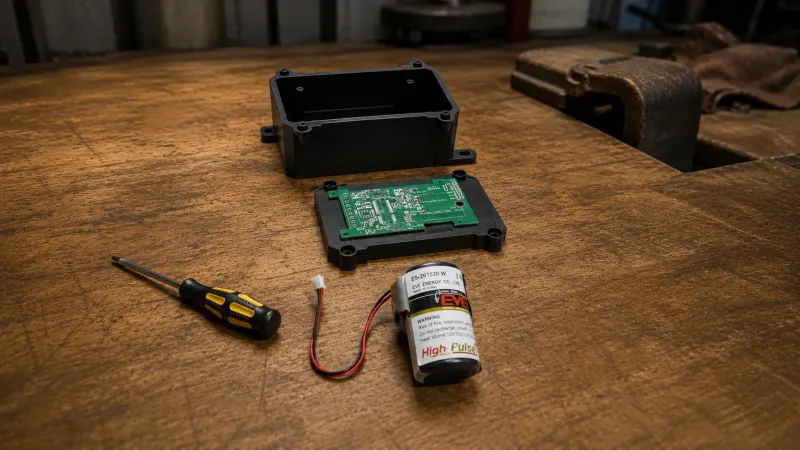
The cells used in long-life sensors are usually lithium thionyl chloride (Li-SOCl2) or lithium manganese dioxide (Li-MnO2), chosen because they have very low self-discharge and hold voltage well over time. The two are not equivalent for outdoor Canadian installations. Li-SOCl2 is generally the better choice for long-life, low-drain sensors in severe cold, with a typical operating range of about -55 to +85 Celsius, very low self-discharge, and high energy density. Li-MnO2 will work in milder conditions but tends to lose more usable capacity at deep prairie winter temperatures. Either way, these are not the same as the AA alkaline batteries in a TV remote, they behave differently in cold, and they cannot always be sourced at the local hardware store.
Treat the headline number as a best case for a sensor sitting on a desk in the engineer's office. Your number will generally be lower, sometimes a lot lower.
What actually shrinks battery life
Several things conspire to bring that ten-year figure down to something closer to three to seven years on a working operation. These are the ones that come up most often.
Reporting frequency. Every transmission costs energy. A sensor reporting every fifteen minutes uses roughly twice as much radio and sensing energy per day as one reporting every thirty minutes, and four times as much as one reporting every hour. Total battery life will not scale exactly in line with that, because sleep current, sensor warm-up, retries, spreading factor, and self-discharge all add their own load on top. The practical point still holds: for most environmental monitoring, fifteen to thirty minutes is plenty.
Signal strength to the gateway. When a sensor cannot reach the gateway on the first try, it retransmits at a higher power setting and sometimes retries multiple times. A sensor at the edge of coverage can burn through battery several times faster than the same sensor sitting close in. If you are seeing one sensor drain much faster than its neighbours, signal quality is the first thing to check.
Extreme cold. Lithium chemistry generally tolerates cold better than alkaline, but it still suffers. Below about -20 Celsius, internal resistance climbs and usable capacity drops. Below -30 or -35, some sensors will report low battery even though the cell has plenty of life left at warmer temperatures.
Extreme heat. Sustained temperatures above about 60 Celsius accelerate self-discharge and shorten total life. This rarely matters for indoor sensors, but a sensor in direct summer sun on a south-facing wall can see surface temperatures well above that.
Active humidity and gas sensing. A plain temperature sensor draws very little power between readings. A sensor that also measures humidity, CO2, or VOCs powers a more energy-hungry sensing element each cycle, and these multifunction sensors often have battery life that is a third or a half of an equivalent temperature-only model.
Confirmed uplinks. Some sensors require an acknowledgement from the gateway for every transmission. This roughly doubles radio time per reading. Unless you have a specific reliability reason, unconfirmed uplinks are usually fine for environmental monitoring.
A realistic example
Consider a typical LoRaWAN temperature and moisture sensor in a canola bin. With fifteen-minute reporting, moderate indoor temperatures, and good signal to the gateway, you might reasonably expect five to seven years of useful life. That same sensor mounted on an outdoor tank in a -35 Celsius prairie winter, with marginal signal and occasional retries, might give you three to four years or less. You may also see seasonal low-battery warnings or even brief dropouts well before true end of life, simply because cold-induced voltage sag pushes the cell below the sensor's reporting threshold on the coldest days. Same hardware, same spec sheet, very different reality. Knowing which kind of installation you have lets you plan correctly instead of being surprised.
How to read battery information from your sensors
Most LoRaWAN sensors do not report a precise voltage. The standard battery status field used by many devices is a four-bit indicator with sixteen levels, so what you see in your dashboard is typically a coarse percentage that drops in steps rather than a smooth line. A sensor will sit at one hundred percent for years, then move to ninety, then eighty, with months between each step. Toward the end of life, the steps tend to come faster.
A few practical implications:
Do not panic when the first drop happens. Going from one hundred percent to ninety percent does not mean ten percent of the battery is gone. It means the voltage has crossed one threshold. There is often a lot of life left.
Do watch the rate of change. If a sensor that used to drop one level a year starts dropping a level every couple of months, something has changed. Often the cause is colder weather, weaker signal, or a configuration change to faster reporting.
Treat the last twenty percent as the danger zone. Once a sensor is reporting twenty percent or less, the remaining life can be short and unpredictable. This is when you want a fresh sensor or a fresh battery ready to swap in.
A good monitoring platform will let you set a low-battery alert at a threshold that gives you time to act, generally somewhere between thirty and forty percent for sensors in remote locations.
Planning replacements before they bite you
Once you have more than a handful of sensors, the question stops being "when will this battery die" and starts being "how do I keep all of these batteries from dying at the worst time." A few habits make this much easier.
Batch replace by deployment year. If you installed twenty sensors in the same week in 2024, they will generally need batteries or replacement around the same time in the late 2020s. Rather than waiting for each one to fail individually, schedule a single visit to swap them all once any of them hits a meaningful low-battery threshold. You save trips, and you avoid the slow trickle of dead sensors at random times.
Keep a small stock of spares on hand. A spare sensor of each type, or a spare set of batteries if the cells are user-replaceable, is usually cheaper than losing coverage during a critical storage period. The sensor that dies is almost never the one you expected.
Set alerts for sensors that go quiet. Battery percentage is one signal. Total radio silence is another. A sensor that has not reported in twenty-four hours might have a dead battery, a failed gateway, a chewed antenna, or a sudden loss of signal due to something new in the path. Your monitoring system should alert on these dead-zone gaps the same way it alerts on temperature excursions.
Document install dates. Sounds obvious, almost no one does it well. A simple note in your monitoring platform, or even a label with a date on the sensor itself, makes future planning much easier.
A few common pitfalls
Some specific things to watch for as you build out a fleet of sensors.
Proprietary battery formats. Some sensors use a custom battery pack you can only buy from the manufacturer. When the sensor is six years old and the manufacturer has moved on, those batteries can be hard to find. Standard cell formats like AA, 2/3 AA, or 18650 are more forgiving over the long term.
Sealed, non-replaceable units. Many low-cost sensors are fully sealed with the battery built in. When the battery dies, the sensor dies. This is fine if you plan for it and treat the sensor as a four-to-seven-year consumable, but it is a surprise if you expected to replace just the cell.
Calibration after replacement. A small number of sensors require a calibration step after a battery change, especially those measuring humidity, CO2, or gas concentrations. Check the manufacturer's instructions before sending a tech out with a handful of fresh cells.
Mixing old and new cells. If a sensor takes two or more cells in series, replace them all together. Mixing a fresh cell with a partially used one shortens the life of the new one and can cause erratic behaviour.
The practical takeaway
Think about wireless sensor batteries the same way you think about other consumables on the farm. They have a useful life, that life is shorter than the spec sheet under real conditions, and the cost of a small amount of planning is much lower than the cost of a missed alert at three in the morning.
Pick a reporting frequency that matches what you actually need. Watch for sensors that drain faster than their neighbours. Set a low-battery threshold you can act on. Batch your replacements. Keep a spare or two on the shelf.
References
-
Saft. "Primary lithium batteries for IoT and industrial applications." saft.com
-
Tadiran Batteries. "Lithium battery chemistry comparison." tadiranbat.com
-
LoRa Alliance. "LoRaWAN technical documentation." lora-alliance.org
Storage Sentry is a wireless monitoring platform purpose-built for Canadian agricultural operations. It tracks sensor battery status, alerts you when readings stop arriving, and helps you plan replacements before a dead sensor turns into a missed alert. Learn how Storage Sentry can help.