Compressor Failure at 2 AM: Why After-Hours Monitoring Matters Most
This article is operational guidance for cold storage operators. It is not legal or food-safety advice. Consult the CFIA, Health Canada, or a qualified food-safety advisor for requirements specific to your operation.
Ask any commercial refrigeration technician when the calls come in, and the answer is consistent. Friday night. Saturday morning. The long weekend. The compressor that ran fine all week quits at 2 AM, and nobody notices until the first person walks through the door eight hours later.
This article is for cold storage and walk-in cooler operators: small grocery, butcher shops, restaurants, farm cold stores, and food packers. It walks through the failure modes that tend to take down refrigeration after hours, why the off-hours timing makes everything worse, and what a monitoring setup needs to look like to actually catch a problem in time to act on it. For the broader cost picture, see the true cost of a walk-in cooler failure, then pair it with temperature alert thresholds for cold rooms.
If you have ever found a warm cooler on a Monday morning, you already know the cost. This is about making sure it does not happen twice.
The failure modes that show up after hours
Walk-in coolers and reach-in commercial refrigeration units fail in a handful of common ways. Most of these problems develop gradually over weeks or months, but the moment of actual failure tends to land at the worst possible time, when the cooler has been loaded after a busy day and the building is empty.
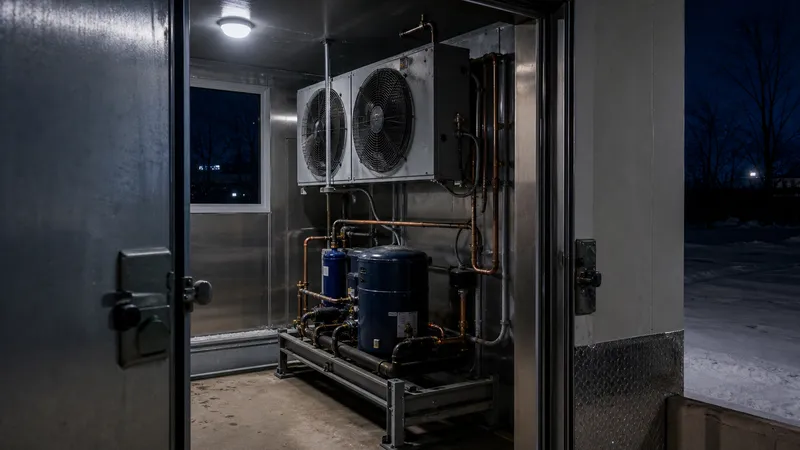
Compressor seizure. The compressor is the heart of the system, and when it locks up, the cooler stops cooling immediately. Seizures are usually the end stage of other problems: low refrigerant charge, dirty condenser coils, electrical faults, or a decade of accumulated wear. A new commercial compressor plus labour can run several thousand dollars, and lead times for parts are often measured in days.
Contactor and relay failures. The contactor is the electrical switch that energises the compressor. When the contacts wear out or weld shut, the compressor either will not start or will not stop. A failed contactor is a cheap part on its own, but the symptom looks identical to a much bigger problem, and the cooler is offline until somebody diagnoses it.
Refrigerant leaks. Slow leaks reduce the system's cooling capacity gradually. The cooler can hold temperature for a while, then on the hottest night of the year, with the door opened a few times during a busy afternoon, the system finally falls behind and never catches up. By morning, the cooler is well above setpoint.
Evaporator fan failure. The evaporator fan circulates cold air through the cooler. When the motor seizes or the blade jams, the refrigeration system itself may still be running, but the cold air sits on the coil instead of moving through the box. Temperature can climb surprisingly fast even though the compressor is working.
Stuck defrost cycle. Most commercial walk-ins run a scheduled defrost a few times a day. If the defrost timer or termination sensor fails, the unit can stay in defrost mode indefinitely, with the heaters on and the cooling off. A stuck defrost overnight will warm a loaded cooler several degrees before morning.
Door left open. Not a mechanical failure, but it accounts for a significant share of after-hours temperature excursions. A door that did not latch properly at closing time, or a gasket worn enough that the door creeps open under its own weight, will let warm air in for hours.
The common pattern across all of these is that the cooler does not announce its failure. There is no alarm light visible from the parking lot, no siren on the building. Without continuous monitoring, the only way anyone finds out is by walking inside and feeling the air.
Why the timing makes everything worse
A failure at 2 PM on a Tuesday is bad. A failure at 2 AM on a Saturday is much worse, and it has nothing to do with the failure itself. Three things compound off-hours timing.
The cooler is full. Anecdotally, refrigeration units tend to give out at the end of the day or after a busy shift, when they have been working hard and the inventory inside is at its peak. A cooler that just absorbed a full day of door openings and warm product loading is already at the upper end of its operating range. A failure at that moment has the most product at risk.
Nobody is checking. Manual temperature checks happen during business hours. The gap between the last evening check and the first morning check is often ten to fourteen hours. Even a small temperature problem that started at 11 PM has a full overnight to grow into a disaster before anyone walks past the cooler.
Service response is slower. After-hours refrigeration calls cost more, and getting a technician on site at 3 AM on a Sunday is not always possible. The clock keeps running on your inventory regardless of how fast you make the call.
The cascade once temperature starts climbing
Health Canada describes the temperature danger zone as 4°C to 60°C, and recommends keeping cold food at or below 4°C and refrigerating perishables within two hours. Above that range, pathogen growth accelerates and product may need to be discarded. Under the Safe Food for Canadians Regulations, federally regulated operations with a Preventive Control Plan that covers temperature-sensitive food may be required to maintain monitoring records, but the exact requirements depend on licence type, commodity, and the specific PCP. Many restaurants and local retail operations are not federally licensed under the SFCR. Either way, a temperature excursion may need to be documented under your preventive control plan, which means it is not just a product loss issue.
In a real failure, the compressor quits at midnight, the cooler holds temperature for an hour or two on residual cold mass, and by 3 AM the temperature is climbing past 4°C. By the time the first staff member arrives, the unit has been outside its safe range for hours. The operator is then making decisions in a hurry: salvage what can be salvaged, discard what cannot, find a working cooler for anything still in range, document everything for insurance and inspections, and call a technician who is fully booked.
Depending on operation type and inventory mix, a full walk-in at a small grocery, butcher, or restaurant can easily hold tens of thousands of dollars in product. For a packing operation or farm cold store, the numbers go much higher.
Why manual checks and end-of-day routines are not enough
Scheduled walkthroughs catch problems that exist at the moment of the walkthrough. They do not catch problems that develop after the last person leaves. A 9 PM closing check that shows everything normal tells you nothing about what happened at 11 PM.
The same is true of scheduled phone reminders, daily logbooks, and the assumption that the alarm horn on the cooler is enough. Most built-in cooler alarms are audible alarms, designed for someone standing near the unit to hear them. They do not call anyone, and they do not page out to staff who are at home.
The honest answer is that the only way to know about an overnight failure overnight is to have something else watching.
What good after-hours monitoring actually looks like
A monitoring setup that earns its keep needs a few specific properties. Each of these matters individually, and missing any one of them creates a weak point.
Continuous readings, not periodic logs. Sensors that report every few minutes catch problems while they are developing. A logger that downloads once a day will tell you about last night's failure tomorrow afternoon.
Threshold-based alerts that actually reach a person. A dashboard that shows a red number is useless if nobody is looking at it. Alerts need to go out by SMS and email, with sustained-threshold logic, short delay windows, or defrost-aware thresholds so that brief, expected swings do not trigger pages. Rate-of-rise alerts can also catch a real failure earlier than a fixed setpoint, while still ignoring routine fluctuation.
An escalation chain. The first person on the alert list may not see the message. They may be asleep, on vacation, or out of cell range. A good escalation policy notifies a primary contact, waits a short window, then notifies a backup contact, and a backup after that. At least one person on the chain needs to be able to physically respond.
Redundant sensors in critical units. A single sensor is a single point of failure. For a cooler holding significant inventory, two sensors at different points in the box cost very little and protect against sensor drift, battery failure, or a sensor that ends up in a cold spot or near the evaporator coil.
Power and connectivity that does not depend on the building. If the cooler failed because the power went out, a monitoring system that runs on the same power and the same internet connection went down with it. Battery-powered sensors are only half the picture: the LoRaWAN or cellular gateway and any router or modem in the backhaul path also need a UPS or battery backup, or the alert never leaves the building.
Who should be on the alert list
Build the list backwards from the response. The question is not who should know, it is who can get to the cooler fastest at 2 AM and make a decision.
For most small operations, that is the owner or general manager as the primary contact, a trusted senior staff member as the backup, and a designated refrigeration service company as a third tier. Larger operations should add a maintenance lead and consider geographic coverage so that someone on the list is always within a reasonable drive.
Set realistic thresholds. A cooler set to 2°C should not alert at 3°C if a normal defrost cycle takes it briefly to 4°C. Alerts that fire on every minor fluctuation get muted, and a muted alert system is worse than no alert system at all.
Practical next steps
If you operate a walk-in cooler or commercial refrigeration unit that runs unattended overnight, a few concrete actions reduce your exposure significantly.
Audit your current alerting. Whatever is in place right now, test it. To simulate a warm-cooler alarm, briefly warm the sensor in your hand or a glass of warm water, temporarily lower the high-temperature threshold, or use the platform's built-in test-alert feature. Confirm that the alert actually reaches the people who need it.
Document the escalation chain. Write down who is contacted, in what order, with what delays. Post it where staff can see it.
Add monitoring if you do not have it. A small wireless sensor system protecting tens of thousands of dollars in inventory can pay for itself the first time a major failure is caught early.
Treat after-hours readings as your priority data. The numbers that matter most for spoilage risk and compliance are the ones generated when nobody is in the building. Make sure those readings are being captured, alerted on, and stored.
A compressor will fail eventually. The question is whether you find out at 2:05 AM, when you can still save the inventory, or at 8 AM, when you cannot.
Storage Sentry is a wireless monitoring platform purpose-built for Canadian cold storage and food operations. Continuous sensor readings, configurable thresholds, SMS and email alerts, and escalation chains are designed to help operators respond to refrigeration failures before product is lost. Learn how Storage Sentry can help.
References
-
Health Canada. "Food Safety and You." canada.ca
-
Canadian Food Inspection Agency. "Guide for Preparing a Preventive Control Plan." inspection.canada.ca
-
Canadian Food Inspection Agency. "Preventive Control Plans: Record Keeping." inspection.canada.ca
-
Contracting Business. "Don't Be a Compressor Serial Killer: Know Causes to Prevent Repeat Failures." contractingbusiness.com
-
Howard Services. "Commercial Refrigeration Compressors: How Long Do They Last?" howardserviceshvac.com